Salesforce MFA Enforcement 2026: What Mortgage CRM Teams, Loan Officers & Salesforce Admins Need to Know
Salesforce is rolling out mandatory multi-factor authentication in two tracks, and mortgage teams are getting hit harder than most. The broader MFA-for-all-users requirement was paused on July 1, 2026, but the phishing-resistant tier for privileged users, including anyone holding Modify All Data, View All Data, or the System Administrator profile, was never delayed. For mortgage CRM teams, that distinction matters: loan processors and underwriters often inherit broad data access through old permission sets, which quietly makes them "privileged" under Salesforce's rule, whether their title says admin or not.
This guide breaks down what a Salesforce admin needs to audit before enforcement resumes, how the change impacts loan officers logging in from the field, why Salesforce Financial Services Cloud users face extra exposure, and what it means for loan origination software integrations running on OAuth. It closes with a compliance checklist mortgage teams can work through now, and a look at why running a compliance-heavy lending operation on a general-purpose CRM means inheriting security mandates on someone else's timeline.
A processor at a mid-size broker shop tried to log into Salesforce on a Monday morning to push out three loan files before a rate lock deadline. Instead of the pipeline view, she got a screen asking her to set up an authenticator app. Nobody on the ops team had mentioned it was coming. The files sat for forty minutes while she waited for an admin to walk her through enrollment on a call.
That's the small version of what's been happening across the Salesforce ecosystem this year. The Salesforce MFA rollout is Salesforce's response to a wave of credential theft and data breach incidents tied to AI-assisted phishing kits, and if your mortgage shop runs on Salesforce or Salesforce Financial Services Cloud, it's worth twenty minutes of your time before enrollment shows up on someone's screen unannounced.
Salesforce MFA Enforcement at a Glance
|
Requirement |
Status |
|
MFA for all users |
Delayed |
|
MFA for privileged users |
Active |
|
SMS Authentication |
Not Allowed |
|
Email Authentication |
Not Allowed |
|
Security Keys |
Recommended |
|
Salesforce Admin Preparation |
Required |
What is Salesforce MFA?
Salesforce MFA is a login requirement that forces users to verify their identity with more than a username and password before they can access Salesforce, including Financial Services Cloud. Instead of a password alone, a second factor is required: an authenticator app, a security key, or a built-in device method like Touch ID or Windows Hello. Salesforce has been pushing multi-factor adoption for several years, but 2026 marks the shift from "recommended" to enforced, with a stricter tier for anyone holding admin-level permissions.
For a Salesforce admin, this changes how every user in the org logs in, and it changes what "compliant" even means depending on which permissions a given user holds.
What Salesforce is actually changing
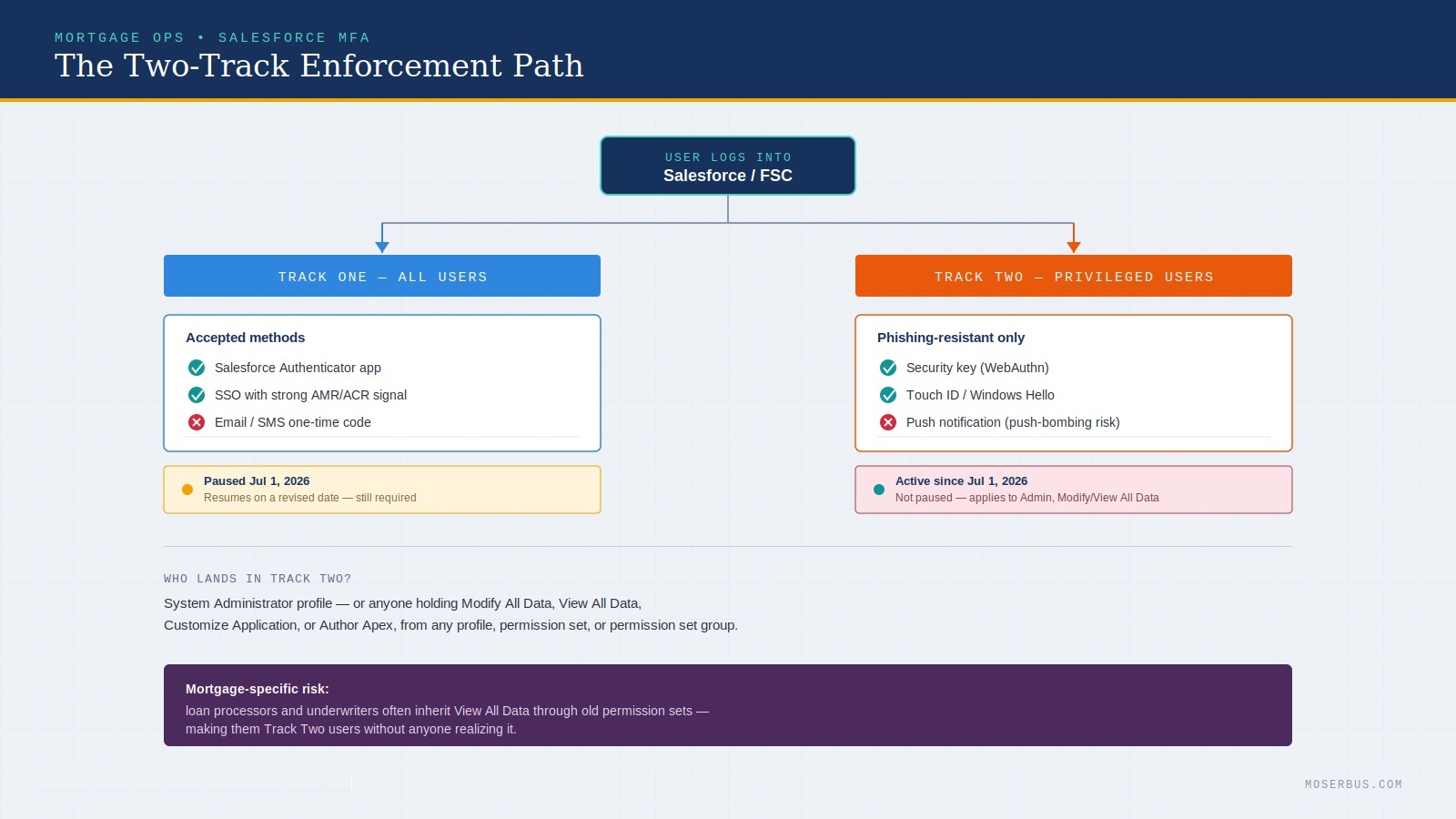
Salesforce is rolling out mandatory multi-factor authentication in two separate tracks, and mortgage teams need to understand both because they hit different people on your team.
Track one: MFA for every internal user. Anyone logging into Salesforce directly through the UI, or through a single sign-on (SSO) provider like Okta or Microsoft Entra ID, has to complete multi-factor authentication — what most people still call two-factor authentication, though Salesforce's rules technically allow more than two factors. Salesforce's own native MFA, an SSO-enforced method, or a third-party authenticator app all count. A one-time code sent by email, SMS, or phone call does not count, no matter which system is enforcing it.
Track two: phishing-resistant MFA for privileged users. This is the stricter tier, and it applies to anyone with the System Administrator profile, or anyone holding Modify All Data, View All Data, Customize Application, or Author Apex — whether that permission came from a profile, a permission set, or a permission set group. For these users, a standard authenticator app push or a TOTP code from Google or Salesforce Authenticator is no longer enough. Salesforce wants a security key, a built-in device authenticator like Touch ID or Windows Hello, or a certificate-based method. Push notifications get flagged specifically because of "push bombing," where an attacker who already has a stolen password just spams approval requests until someone taps "yes" by accident.
Here's where it gets messy: the dates have already moved once. Salesforce originally set sandbox enforcement for June 22, 2026, with production following on July 20. Then, on July 1, Salesforce quietly paused the "MFA for All Employee Users" rollout — the broader, non-admin track — through a notice on its help documentation, giving no reason and no new date at first. A day later, the notice was updated again to say the rollout would resume on a revised schedule. The phishing-resistant requirement for privileged users, notably, was not paused and is still moving ahead on its original June 22 (sandbox) and July 1 (production) dates.
If you're planning around a single fixed deadline, stop. Plan around the requirement existing, not around a date Salesforce has already changed once this summer.
How Salesforce MFA Impacts Loan Officers
A loan officer doesn't usually carry admin permissions, so it's tempting to assume Track One is the only thing that matters to them. In practice, enforcement changes their day-to-day login whether they're an admin or not, and it can collide badly with rate-sensitive work.
Someone working a mortgage CRM tends to log in from more places than a typical office employee: a laptop at the branch, a phone in a car between appointments, sometimes a tablet at a client's kitchen table. Each of those is a login moment MFA now touches. If enrollment isn't handled ahead of time, they can get locked out mid-appointment, right when they're trying to pull pricing or confirm a rate lock in front of a borrower.
Salesforce has also added step-up prompts for report exports, which matters for anyone used to pulling a pipeline report on the fly. The fix isn't complicated: get people enrolled in a phishing-resistant method before their access is forced to change, not after.
Why this lands harder on mortgage teams than on a typical sales org
A generic sales team logs a handful of admins and a pool of reps who mostly just need read/write access to opportunities. Mortgage ops doesn't work that way.
Loan processors, underwriters, and compliance staff often end up with broad data visibility because loan files touch nearly every object in the org — borrower records, documents, disclosures, investor conditions. It's common for someone whose actual job is processing loans to have View All Data or a permission set that quietly grants it, just because narrower access kept breaking a report or a workflow somewhere. That person is now a "privileged user" under Salesforce's definition, whether or not their title says admin.
Add to that: mortgage shops tend to run lean on Salesforce administration. Many have one admin, sometimes a part-time one, managing an org that was configured years ago by a consultant who's long gone. Auditing every permission set and permission set group for who actually holds Modify All Data or Author Apex isn't a quick task when nobody fully remembers how the org was built.
Then there's the compliance angle. A locked-out loan officer during a rate lock window, or an underwriter who can't pull a report because step-up authentication kicked in mid-session, isn't just an inconvenience — it can be the difference between honoring a rate and re-locking at a worse one.
Salesforce Financial Services Cloud Users Need Special Attention
Salesforce Financial Services Cloud sits on top of standard Salesforce, and that layering is exactly why enforcement catches its customers off guard. Custom objects like Financial Accounts, Household groups, and relationship maps are frequently accessed through custom permission sets an old consultant built years ago, and those can grant Modify All Data or View All Data without anyone realizing it.
That matters because this layer is common in mortgage operations specifically for its household and relationship modeling, and the people using those features day to day, loan processors mapping co-borrowers, underwriters reviewing household income, are exactly the users most likely to be flagged as privileged. A Salesforce admin auditing permissions on a plain Sales Cloud org has a narrower job than one auditing an org layered with custom objects and inherited permission sets. Budget extra time for this audit if Financial Services Cloud is part of your stack.
Key Takeaways
- Salesforce MFA enforcement is being rolled out in phases, not on a single fixed date.
- Privileged users require phishing-resistant authentication, and that requirement was not delayed.
- Loan officers and mortgage operations teams should review permissions now, before enrollment is forced.
- Salesforce Financial Services Cloud customers may face additional compliance work because of inherited permission sets.
- Connected apps and loan origination software integrations should be audited before enforcement resumes.
Salesforce MFA Compliance Checklist for Mortgage Companies
If you're running Salesforce or Financial Services Cloud for your loan pipeline, work through this before enforcement resumes rather than during the week it lands.
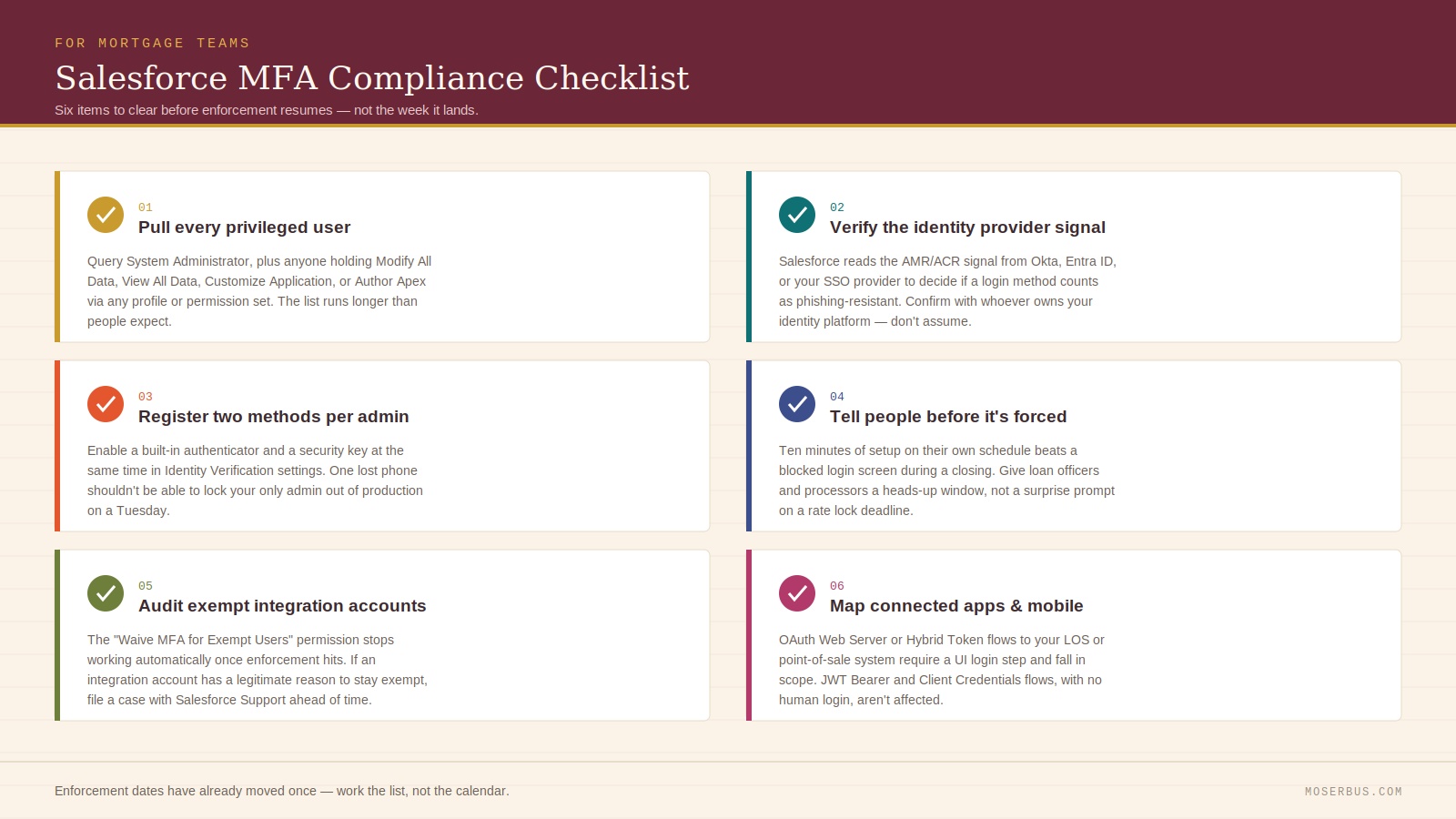
- Pull every privileged user. Query for the System Administrator profile, then separately query for anyone holding Modify All Data, View All Data, Customize Application, or Author Apex through a permission set or permission set group. The list is almost always longer than people expect.
- Check what your identity provider is actually sending. If your team logs into Salesforce SSO through Okta, Entra ID, or another provider, Salesforce reads the AMR or ACR signal in the SAML assertion or OIDC token to decide whether the login method counts as phishing-resistant. A setup that satisfies your internal security policy can still read as "standard" to Salesforce if the IdP isn't passing the right signal, so confirm this with whoever owns your identity platform rather than assuming.
- Register two phishing-resistant methods per admin, not one. Salesforce's Identity Verification settings in Setup let you enable both a built-in authenticator and a security key at the same time, so a lost phone or a dead security key shouldn't be able to lock your only Salesforce admin out of production on a Tuesday.
- Tell people before enrollment is forced on them. Ten minutes of setup on their own schedule beats a blocked login screen during a closing.
- Check exempt integration accounts. The "Waive Multi-Factor Authentication for Exempt Users" permission, which some orgs use for integration accounts, stops working automatically once enforcement hits. If you have a legitimate reason to keep an account exempt, such as a testing tool, file a case with Salesforce Support ahead of time.
- Map your connected apps and mobile setup. If loan officers pull up Salesforce or Financial Services Cloud through the mobile app on an older Mobile SDK build, they can get blocked outright unless advanced authentication is configured in My Domain. Any connected app using OAuth Web Server or Hybrid Token flows to talk to your loan origination software or point-of-sale system requires a UI login step, which puts it in scope for enforcement too. Apps that authenticate through JWT Bearer or Client Credentials flows, without a human logging in through a browser, aren't affected. If your integrations team hasn't mapped out which connections use which flow, that's a half-day project worth doing before enforcement resumes rather than after someone's loan origination software sync stops working.
The bigger question this raises
Here's the thing worth sitting with. Salesforce built its security roadmap for the broadest possible customer base — retail companies, service teams, manufacturers — and mortgage operations got pulled into the same enforcement schedule as everyone else, on Salesforce's timeline, with Salesforce's definitions of who counts as "privileged." A mortgage shop didn't get a say in when phishing-resistant MFA becomes mandatory for the underwriter who happens to have View All Data.
That's the tradeoff of running a compliance-heavy, license-driven business on a general-purpose CRM. You inherit every platform-wide security change, licensing shift, and permission model update on someone else's release calendar, whether or not it fits how a loan actually moves from application to close. We wrote about this pattern in more depth in why traditional CRMs fail loan officers — the tools weren't built around a loan file, so mortgage teams spend real time bending them into shape, and now that includes auditing permission sets for a security mandate that has already changed its own deadline mid-rollout.
If you're shopping for CRM software right now and weighing whether to stay on Salesforce or move somewhere purpose-built, that's exactly the calculation worth running before you sign another renewal. MoserBus was built the other way around, starting from the loan file instead of a generic object model. Pipelines, document tracking, and communication are already mapped to how a mortgage deal actually moves, so your team isn't maintaining a patchwork of permission sets just to keep processors and underwriters working without over-exposing sensitive borrower data. If you're curious what that looks like next to a retrofitted Salesforce org, our breakdown of the best mortgage CRM software in 2026 walks through the comparison, and our guide to what a loan origination system actually does is a good starting point if you're rethinking your stack from scratch rather than patching the one you have.
None of this is an argument against MFA. Credential theft is real, and AI-driven phishing has made stolen passwords cheaper to exploit than they used to be — Salesforce is right to close that gap. The argument is about where you want your ops team spending its attention: auditing permission sets against a moving compliance deadline, or working the pipeline.
Related Resources
- Why Traditional CRMs Fail Loan Officers
- Best Mortgage CRM Software in 2026
- What Is a Loan Origination System?
- Salesforce vs Mortgage CRM: Which Is Better?
- Mortgage Automation Best Practices
Ready to Simplify Mortgage Operations?
Managing Salesforce MFA, permissions, compliance requirements, and integrations can quickly become complex for growing mortgage teams.
Whether you're evaluating a new mortgage CRM, comparing loan origination software options, or looking for a purpose-built loan origination system, choosing the right platform can save countless hours of administration and reduce compliance risks.
Explore how MoserBus helps loan officers, processors, and mortgage operations teams streamline workflows, manage borrower pipelines, and stay compliant without the complexity of a traditional CRM.
Book a Demo Today and see how a mortgage-first platform can support your growth.
Frequently Asked Questions
What is Salesforce MFA? Salesforce MFA is Salesforce's multi-factor authentication requirement, which forces users to verify their identity with a second factor beyond a password before accessing Salesforce or Financial Services Cloud.
Is Salesforce MFA mandatory? Yes, for privileged users the phishing-resistant requirement is mandatory and was not delayed. The broader MFA-for-all-users track was paused on July 1, 2026, but a revised production date has since been announced, so the requirement itself isn't going away.
Does Salesforce MFA affect Financial Services Cloud? Yes. Financial Services Cloud runs on top of standard Salesforce, and users working with its custom objects often hold inherited permissions like View All Data without realizing it, which pulls them into the privileged-user tier.
How can a Salesforce Admin prepare for MFA enforcement? A Salesforce admin should pull every user with System Administrator, Modify All Data, View All Data, Customize Application, or Author Apex, register two phishing-resistant methods per admin account, and confirm the identity provider is sending a compliant AMR/ACR signal.
Does MFA impact Loan Origination Software integrations? It can. Connected apps using OAuth Web Server or Hybrid Token flows to sync with loan origination software require a UI login step, which puts them in scope for enforcement. Apps using JWT Bearer or Client Credentials flows aren't affected.
What is the difference between a Mortgage CRM and Loan Origination System? A mortgage CRM manages relationships, pipeline, and communication with borrowers and referral partners, while a loan origination system processes the loan file itself, from application through underwriting to close. Many mortgage teams run both, which is part of why permission auditing gets complicated.
If your team is still sorting out permission sets six months from now, or you're rethinking whether a general-purpose CRM should be running your loan pipeline at all, schedule a demo with MoserBus and see what a mortgage-built platform looks like in practice.